Reviewed September 24, 2026. Features depend on your enabled modules, permissions, and configured integrations.
Tip: permissions
Comms runs on manage_comms with the comms feature. Submitting drafts needs submit_for_approval; signing off needs approve_comms; building pipelines needs manage_approval_pipelines.
Email blasts
A full-screen block composer (headings, images, buttons, columns, social rows, and a footer block with the legally required one-click unsubscribe) with merge fields like {{first_name}} and light/dark previews. Start from a template, blank, or a duplicate of last week's blast.
Recipients pull from multiple sources at once (voter universes, donor segments, volunteer rosters, and pasted lists) with a live deduplicated count that shows suppressed, previously bounced, and unsubscribed exclusions before you send. The sender health review checks SPF / DKIM / DMARC on every verified domain plus suppression size, bounce rate, and complaint rate; fix anything red before sending.
Send now, schedule, or test-send. Delivery tracks per recipient (sent, delivered, opened, clicked, bounced, complained, and unsubscribed), and Resend to failed drafts a new blast pre-filtered to delivery failures. Double hard-bounces, unsubscribes, and spam complaints land on the suppression list automatically.
SMS blasts
Same recipient model, tighter rules. The composer counts segments and characters as you type (attach an image and it becomes MMS), and shows estimated cost before sending: segments times deduplicated recipients times the campaign's per-segment rate (an MMS counts as one unit). "Reply STOP to opt out" is appended automatically and counted in the quote. Set an SMS budget under Setup and a blast that would go over it is refused at send time. Saved-universe targeting resolves the campaign’s current criteria and applies consent, suppression, unsubscribe, valid-phone, and deduplication checks. Keyword opt-outs are handled by the configured inbound SMS integration. Cross-channel suppression consistency remains partial; do not assume a texting opt-out has removed a person from every calling or field queue.
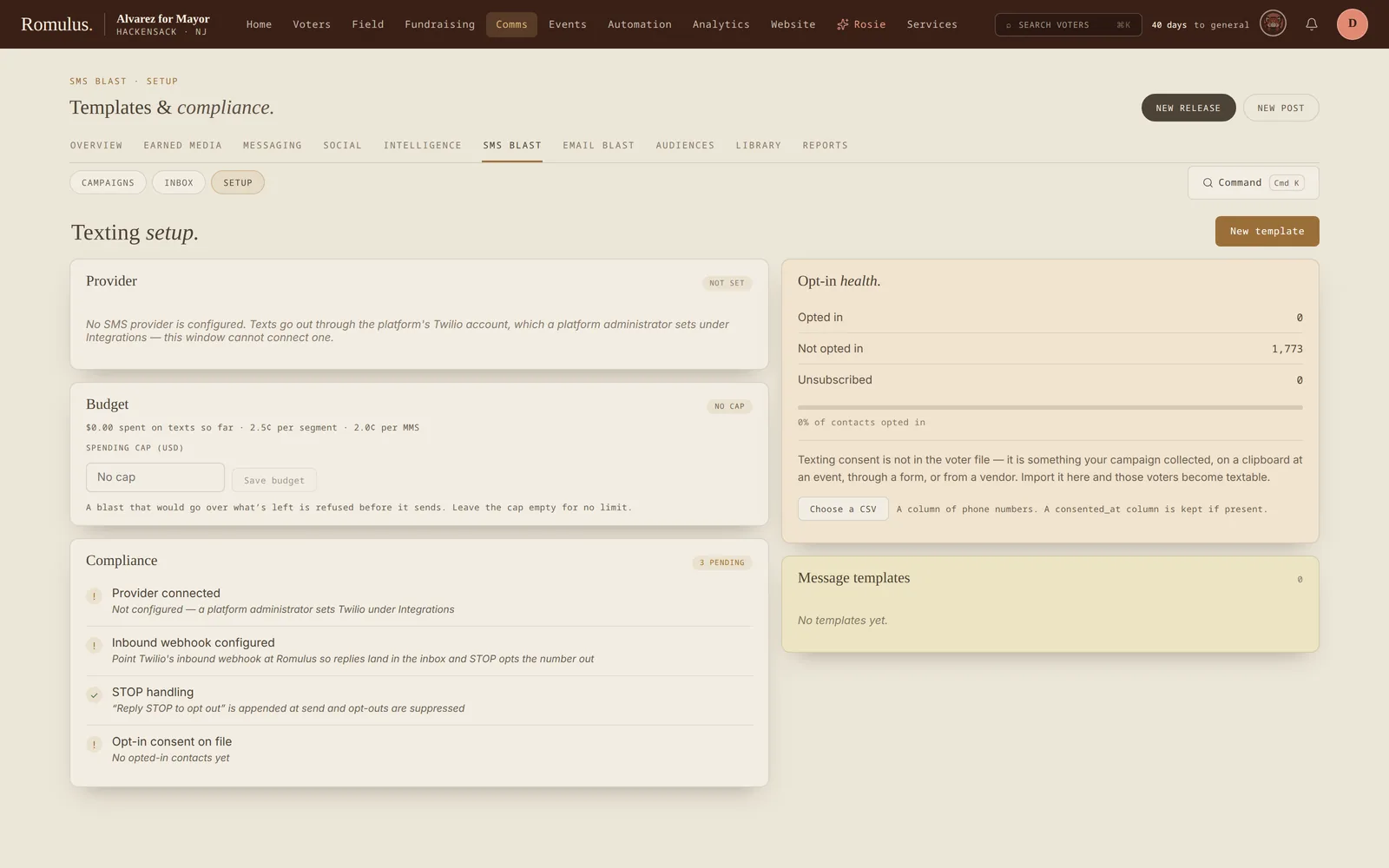
Consent is a real gate. A voter needs a recorded text opt-in to be in the audience, and donors and volunteers pass the same checks, so without imported consent the default audience is zero. The consent import records where each opt-in came from and when. Texts respect quiet hours (8 a.m. to 9 p.m. in the campaign's time zone): a send-now outside that window is refused, recipients inside it are held back, and a scheduled blast waits. A scheduled blast never goes early, and a draft stays a draft. Staff can pause, resume, or abort a blast in flight; resending failures never re-texts someone an abort stopped, and a blast picks up where it left off after a server restart. Links in a text become short tracked links, so clicks count per recipient.
Compliance
Romulus enforces the platform-side rules; the legal layer is yours: TCPA consent, 10DLC registration (its status shows in SMS Setup, and carriers may not deliver until it's approved), and honoring cross-channel opt-outs (someone who asks by phone gets added manually).
Press releases & blog
Press releases, blog posts, and statements use the shared Creator workspace: the composer in the center and preview, publication controls, and delivery history alongside it. Staff can co-edit supported documents live and keep formatting, media, and document structure together.
These three publication types share the status ladder Draft → In review → Approved → Scheduled → Published → Archived. In review reflects the approval request; configured pipelines must clear before protected transitions. Editorial submissions and internal briefings have their own workflows.
Publication can feed the public newsroom, item pages, RSS, and configured campaign website blocks. Review the selected channels and their “went out via” history. Press releases also support letterhead PDF export. Publishing a record and emailing it to a press list are distinct actions.
Rapid response & approvals
Create a statement for a developing issue and work it in the same Creator used for press and blog. Statements follow the shared publication ladder; older flagged or in-progress labels are normalized by the application.
Approval pipelines specify eligible approvers, steps, quorum, and serial or parallel review. Submit the draft through its approval controls and review comments before advancing it.
A statement reaches the public feed only through its selected newsroom publication channel. An approved draft is not a sent email or a public statement. Use the publication and wire controls for the action you intend.
Reporters, briefings & the message framework
The reporter directory and campaign relationship record bring together contact details, beat, outlet, relationship information, and outreach history. The history combines press-wire delivery, press inbox activity, clips, and logged contacts.
Press lists can include explicit members and live beat-based membership. Check the resolved list before sending. The press wire sends email through the configured transport, respects its unsubscribe records, and records delivery attempts; a calendar status alone does not send it.
Messaging pillars and talking points keep approved language available to staff. Surrogate records track spokespeople and appearances; media clips track coverage; editorials track submissions to outlets. Briefings are internal documents with no publication status.
Rosie in the comms shop
Rosie, the campaign AI, reads the whole desk (every press release, blast, blog post, social post, editorial, and rapid response) and can tell you what's gone out and how it performed. Ask her to draft to any channel and she writes a real draft, on message with your pillars and brand, and hands it back as a card you can open and edit.
She never sends. A drafted item sits at draft until a person with the right permission presses Approve on the card, and Approve only ever does the single safe transition for that channel:
Internal briefings have no next state, so Rosie will draft one but there's nothing to approve. It simply lands in the briefing list. Every card's button says exactly what it will do, so "approve" never means more than you expect. The Rosie guide covers the rest of what she can reach.
Social media
Use Social to draft copy, attach supported media, and organize posts by platform, date, and series. Direct publishing depends on configured provider credentials and the provider-specific action.
A post marked Scheduled on the social calendar is a planning record, not a guarantee of unattended delivery. Rosie’s social approval advances that record to Scheduled; a person still completes the publishing step.
Feature availability
Email A/B tests subject lines only. Each variant goes to its share of recipients, split deterministically, and opens and clicks are counted per variant. Everyone outside the sample gets the control subject in the same send. There is no hold-out group that later receives the winner; Pick winner records the best subject for reuse.
Threaded P2P texting and human replies exist. Volunteer claim queues, expanded supervisor controls, and shared quiet-hour/frequency-cap policy are follow-up work. The voter-contact dialer has session and call-recording foundations; a complete telephony provider is not wired into that backend.