Reviewed September 24, 2026. Features depend on your enabled modules, permissions, and configured integrations.
Tip: permission required
You need the view_voters permission to see voter records. Filters and exports require additional permissions covered below.
The search bar
At the top of the Voters tab is the search box. It runs a full-text search across first name, last name, address, and city. The index tolerates partial matches (smit finds Smith), and it's case- and accent-insensitive. Multiple terms are AND-combined: smith ave finds people named Smith who live on an avenue.
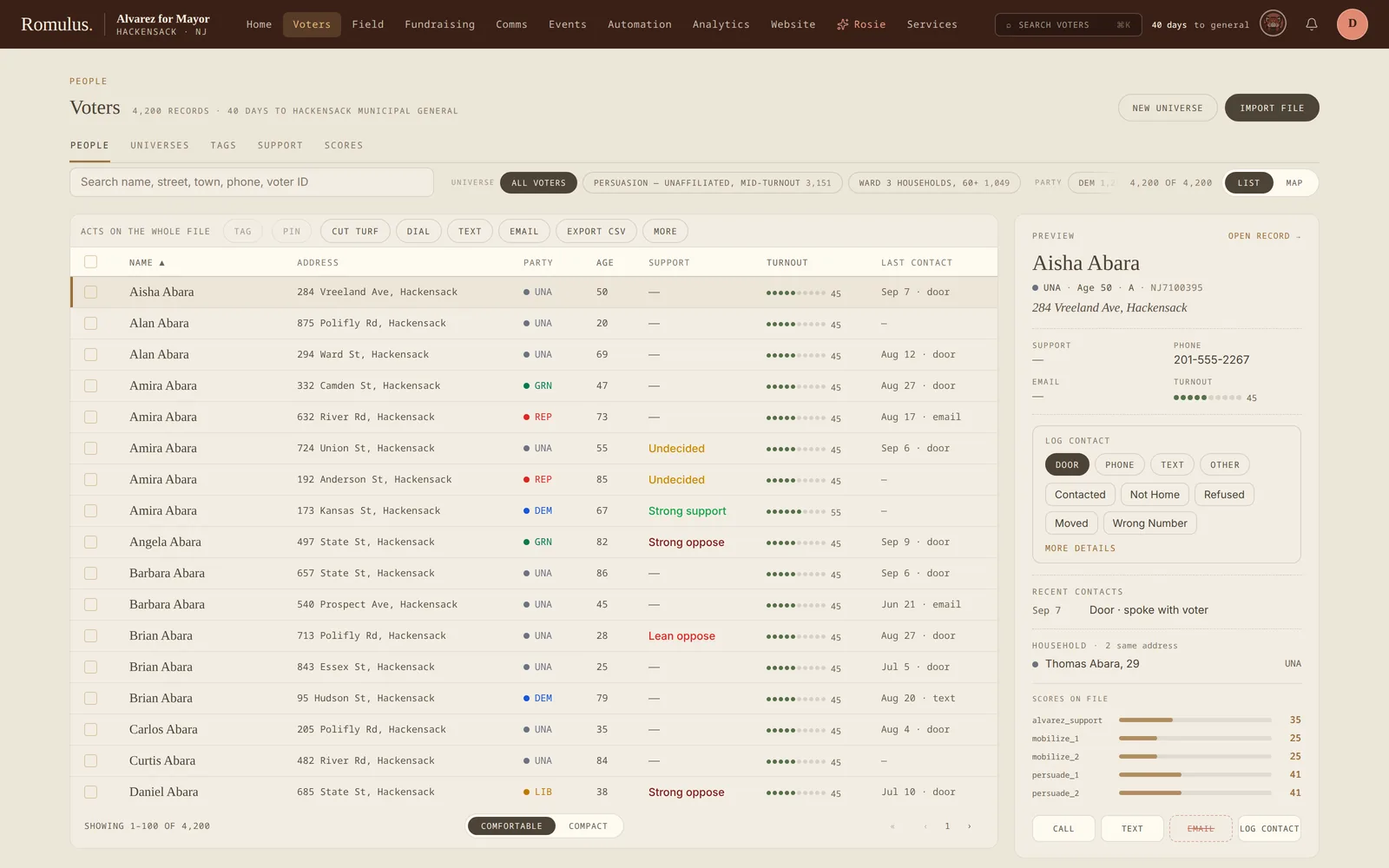
Results appear instantly. Click any row to open that voter's profile.
Filtering the file
The People tab keeps five quick filter chips next to the search box: universe, party, town, support, and tag. Each chip shows its count, and the list updates as you set them. On a phone they fold behind a Filters button. Anything deeper is built in the Universes tab, where each step can use these criteria:
Sorting and pagination
The result table is paginated and virtualized, so even a 5-million-row voter file scrolls smoothly. Use the column headers to sort by name, party, address, support level, or last contact date.
Bulk actions
Select people, or work from a filtered list or universe, and the bulk bar hands the audience to the desk that acts on it:
- Cut turf opens the Field turf cutter on exactly these voters.
- Dial, Text, or Email starts a phone bank, SMS blast, or email blast with this audience already loaded.
- Apply tag labels everyone at once, and Pin to watchlist keeps them in view.
- Save as universe turns the selection into a reusable, live audience.
- Export CSV downloads it (requires
export_voters).
Careful: bulk tags
A tag applied in bulk is recorded in the audit log and can fire the tag's automations. Removing it later takes another bulk action, so if the audience is large, check the count before you apply.
Saving filters
Universes
Named, reusable filter sets that re-evaluate every time you open them. Use one when the filter is a population you'll come back to, such as Likely Dems in Wards 1–3, Persuadable Independents. Live counts, map view, bulk contact, mailing-list export.
Call lists
Lightweight saved filters with a color and a name, good for one-off queues ("call 200 supporters before the rally"). They don't track membership over time the way universes do.
Building a universe, step by step
Some universes are one filter. Most real ones are a stack of moves: start with the whole file, exclude the already-banked, add a persuasion list, narrow to a set of wards. The Universes builder lays those out as ordered step cards, and every step is a live query, not a saved snapshot: the count next to each card is the true cumulative figure after that step, so you watch the audience shrink and grow as you build it. Nothing is estimated. The number on the card is the number of voters the step actually resolves to.
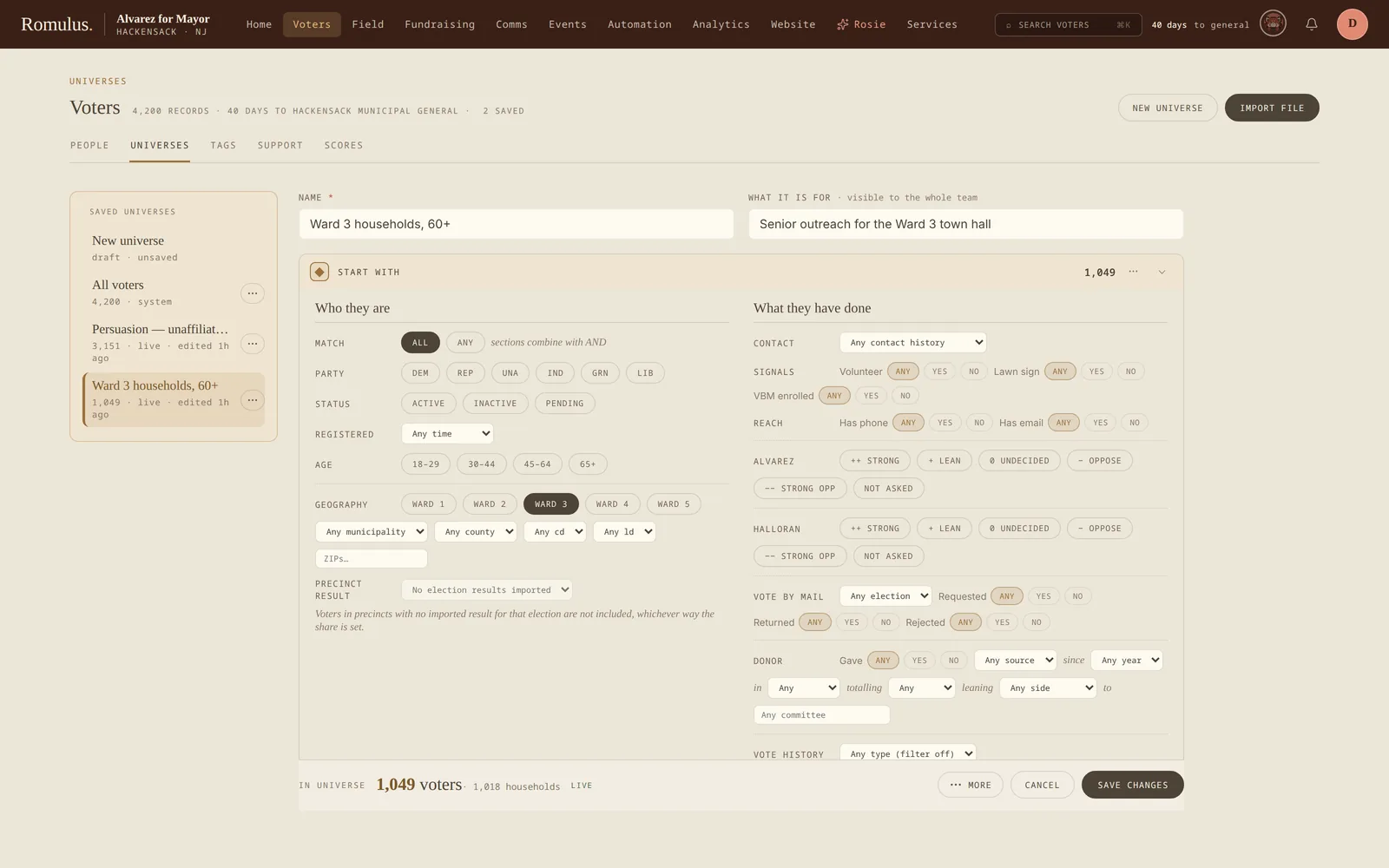
The criteria go deeper than the quick filter panel: age bands read live off date of birth (so two disjoint bands OR together), candidate support takes multiple stances at once (including no recorded stance), and there are ward and recency criteria the console surfaces build on. Because the whole thing re-evaluates on open, a saved universe is a standing definition. Retarget the model or move a voter and the universe follows.
Finding voters who never get a knock
A common workflow is finding voters who haven't been contacted recently:
- Open the filter panel.
- Set Last contact to not in last 30 days.
- Optionally add a party or support-level filter.
- Save the result as a universe: an always-fresh never-contacted universe to draw from.
The universe re-evaluates every time you open it, so as voters get contacted they fall out automatically.
Filtering by custom field
Every custom field your campaign creates becomes a filter in the panel: text fields filter as contains-match, number fields as ranges, dropdown fields as one or more values, checkbox fields as true / false / either, and date fields as ranges.
Tags: manual & smart
Tags are the campaign's own labels on top of the file. A manual tag is a hand-applied sticker, such as Lawn sign, Met the candidate, or Do not door. A smart tag points at a saved universe and keeps itself current: as voters fall into or out of the rule, the tag follows them. A nightly sweep, plus one on save and one after any import that touches voters, reconciles rule membership, and any pin you placed by hand sticks even when the rule wouldn't have caught it.
Tags can also do something when applied. A tag's automations can create a volunteer record, add a do-not-contact entry, open a field task, or notify the comms desk, once per voter, idempotently, always in the audit log. Tagging a supporter Wants to help can seed the volunteer registry without a second step.
Tip: smart tags stay safe at scale
When a smart-tag rule sweeps thousands of voters, only the notify comms automation fires, and it fires once, as a single batched notification. A broad rule can never mass-create volunteer records, DNC entries, or tasks. Delete a universe that still feeds a smart tag and Romulus stops you, names the tags, and offers to convert them to plain manual tags first.
Scores, models & matchback
The Scores tab is one library over every kind of number you might carry on a voter: vendor-licensed columns (turnout propensity, partisanship, a commercial support score), CSV imports you bring in yourself, and models you train in-house. Romulus's own turnout score and each candidate's support, Persuade, and Mobilize scores sit in the same library. Whatever the source, Romulus reads each one as a normalized 0–100 value, so a cutoff, a crosstab, or a sort behaves the same across all of them.
Pick a score and set a cutoff and Romulus counts the universe above it and turns it into a real, saved audience in one step. Compare two scores in a crosstab, check a score's calibration against how those voters actually behaved, and, because a universe built on a score is a live filter, restoring an older version of a model retargets every audience built on it automatically.
✶ Rosie: build a model from plain English
Rosie, the campaign AI, drafts a model as a set of toggleable assumptions, each a filter with a confidence you can dial, and the training pool recounts live as you flip them on and off. Training runs the real logistic-regression pipeline as a cancelable job, learning from one candidate's canvass support IDs where you have enough of them. Each assumption comes back with a verdict and its margin of error. The report shows the weight Rosie assumed against the weight the data learned, so you can see which hunches held up. Publish and it becomes a versioned score like any other: restorable, and safe to build universes on.
Ballot matchback lives in Field, under GOTV: import early-vote or absentee-return data and banked ballots come off a turf's walk list, while voters with a ballot to cure stay on it.
Modeling
The Modeling desk (Voters, then Modeling) is where the campaign's own scores are built, graded, and published. Until you fit a model, turnout is scored with a hand-weighted default. Once you have support IDs, each candidate gets a support model and two working lists: Persuade (voters near the middle who are likely to vote) and Mobilize (likely supporters who are unlikely to vote). Every row on a list says why it's there: movable, but unlikely to vote, not yet canvassed, scored from the party prior, and so on.
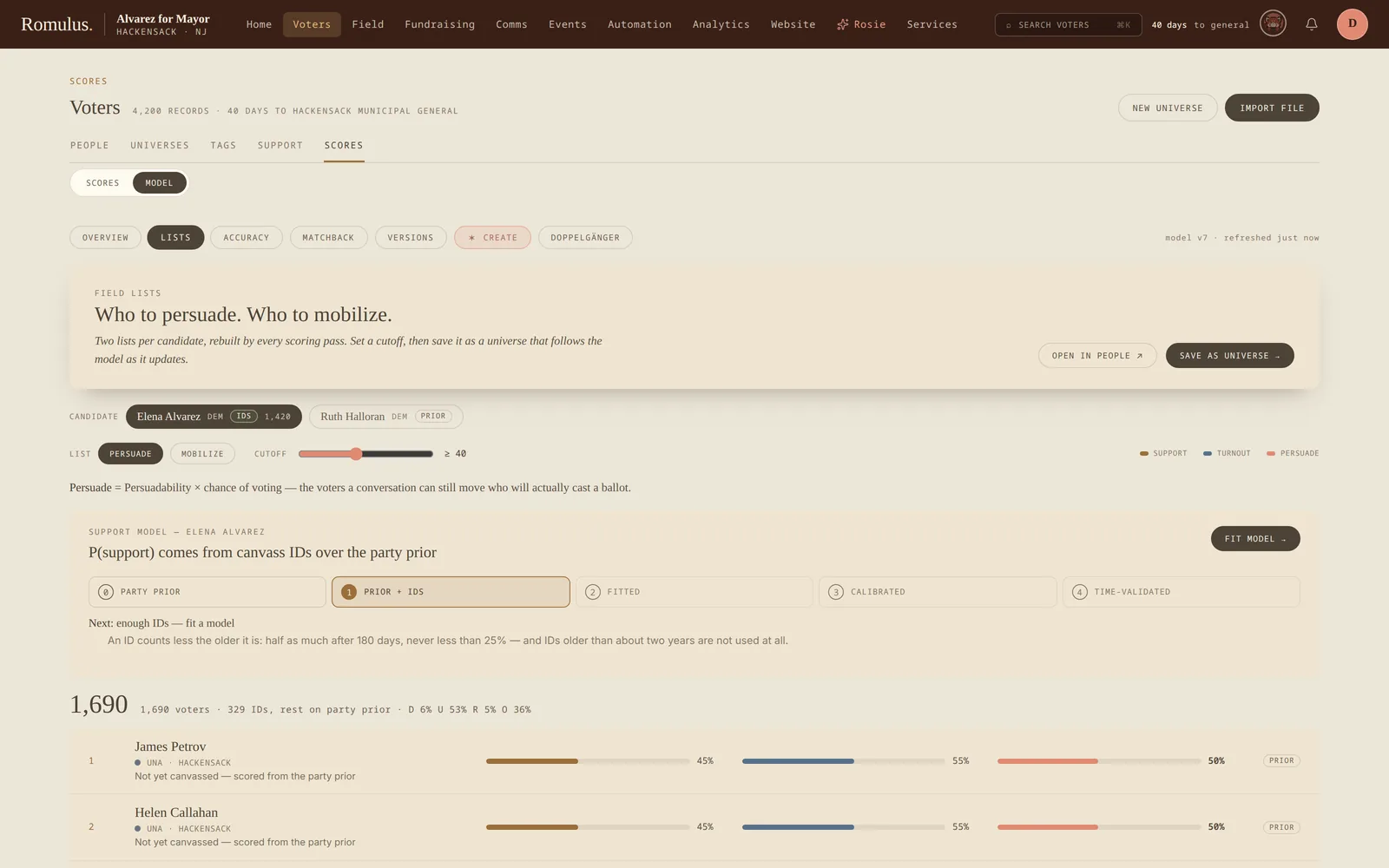
The desk is built not to oversell. Grade tests the score in use against an election it didn't see and saves nothing. Fit learns new weights and saves them unpublished until a person publishes them from Versions. Every accuracy figure comes with its margin of error and the baseline it had to beat (the hand weights for turnout, the party prior for support), and holdouts are split by household so a family can't grade itself. A score is shown as a percentage only when it has been calibrated; before that you get ranks and deciles. Support models refit themselves as IDs come in, and a refit replaces the live one only when it is clearly better. Health checks run after every scoring pass and show as warnings on the Overview.
Matchback on the Modeling desk checks the support model against a real election: it plots the precinct-level support predicted before election day against the two-party result, with party registration as the baseline to beat. It needs imported returns for that election. Doppelgänger finds voters who look like a list you already have.
Support IDs
The Support console is where candidate support IDs live: get more of them, keep the ones you have current, and act on them. It scopes to one candidate at a time and breaks the work into coverage (who's been ID'd), freshness (which IDs have gone stale), targeting (support crossed against modeled turnout), and a work list.
Its buttons build real audiences: a re-ID list of supporters whose ID has aged past a window you choose, and a chase list of confirmed supporters who haven't banked a ballot yet. Both save as universes, so they're live filters. A voter drops off the chase list the moment their ballot lands.
Exporting
With the export_voters permission, the Export CSV button downloads the currently filtered universe. The export includes:
- All standard voter columns: name, address, party, district, and so on.
- All custom field values for your campaign.
- Latest support level and engagement flags.
Every export is recorded in the audit log with the number of rows exported and the filter criteria used.