Reviewed September 24, 2026. Features depend on your enabled modules, permissions, and configured integrations.
Tip: permissions
Field requires the field feature. Viewing turfs needs view_voters; creating or editing them needs manage_turfs; canvass events run on manage_volunteers.
Turfs
Turfs split your voter file into geographic chunks a single canvasser can reasonably knock in one shift: a name, a list of assigned voters, an optional polygon on the map, an optional script, and notes for canvassers ("Stay on east side of Main").
Turfs are made in the turf cutter, under Field, then Turf map. There are three ways in:
- Draw. Draw polygons on the map, optionally narrowed first to a saved universe or a district. Stage as many as you need, then submit them together.
- Auto-cut. Pick a universe and a target size (25, 40, 60, or 80 doors) and Romulus cuts walkable turfs. A household is never split, street runs stay whole, and no turf crosses a highway, arterial, railroad, or water, using Census TIGER barrier data. Options cover one side of the street per turf, big apartment buildings as their own turf, and a cap on the longest walk. If the barrier data can't be reached, the cut runs without it and tells you. Voters left isolated are gathered into turfs marked Scattered.
- From the voter file. Cut turf on any selection of people or any universe opens the cutter on exactly those voters.
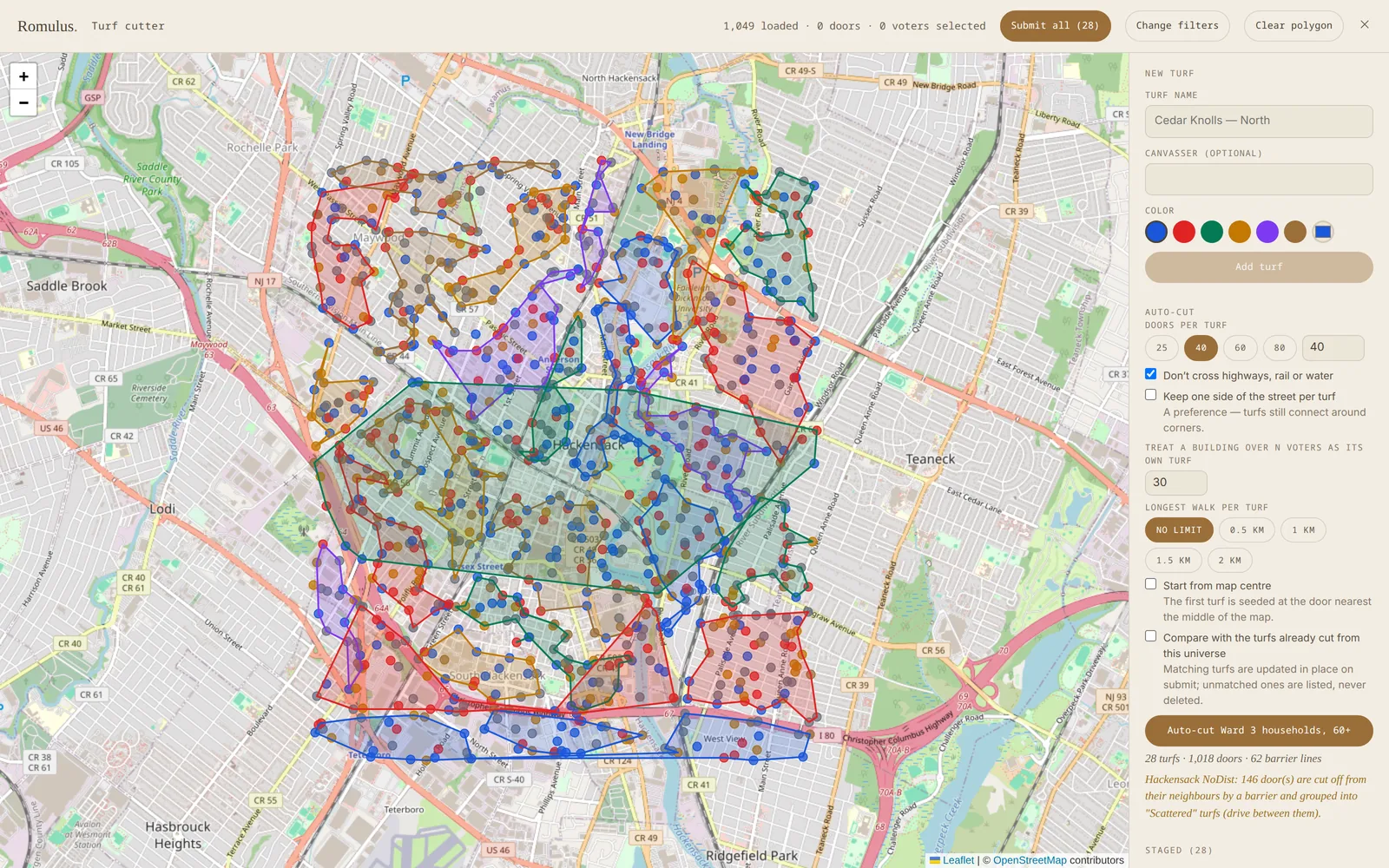
Nothing is written until you submit. When you cut the same universe again, Compare with the turfs already cut sorts the new plan into kept, changed, and new turfs. Matched turfs update in place, and nothing is deleted for you. Walk order groups voters into one stop per door and orders the stops by walking distance: by road where road routing is available, in a straight line otherwise. The route is stored with the turf, so the canvasser map can show it without signal.
The turf list shows voter count, contacted-in-30-days, % complete, and last canvass; click into a turf for a color-coded contact-age map, outcome breakdowns, script response summaries, and per-canvasser session stats. Each turf also carries a canvass mode (standard door-knock, lit drop, ID, or interview), set on its field-ops panel, and that choice decides what canvassers see at the door.
A turf can also be held out as a control. Its voters leave the Persuade and Mobilize lists, and walk sheets, packets, and the canvasser app all refuse it, so the program has something honest to be measured against.
Canvass events
A canvass event is a scheduled operating moment, like Saturday morning or GOTV weekend. The turf is the geography; the event is the moment. Create one with a name, a type (canvass, phone bank, visibility, or registration drive), and a date, then add one or more shifts. Each shift has its own time window, meet location, captain, the number of volunteers it needs, and whether it's paid. Turf is assigned to a shift afterward. Volunteers carry one organizing role on their registry profile:
✶ Rosie: a canvass from one request
Ask Rosie to plan Saturday's canvass and she counts the universe and its households, previews a turf cut, sizes the shift against a no-show forecast, ranks volunteers, pairs them with the nearest turf by home address, and drafts the invite. It comes back as a card with three stages, and a person approves each one in order: the event and shift, then the cut and assignments, then the invites. Invites go by text or email with do-not-contact rules and quiet hours enforced, stop at the shift size, and put the overflow on a waitlist.
Canvass review queue
With feature_canvass_review on, canvasser submissions wait in a pending queue for staff approval before writing to the voter file. Approve or reject individually, or bulk-approve a canvasser's whole shift. Useful with lots of new volunteers; turn it off for trusted teams.
Scripts & walk sheets
Scripts are per-turf, so a stronghold turf and a swing turf can ask different questions. Each question has a prompt, an answer type (multiple choice, yes/no, free text, 1–5 scale), optional branching (show only if a previous answer matched), and an optional maps-to, so the answer feeds a structured voter field or custom field. You can also Draft with AI: describe the goal in a sentence and edit the proposed script.
For paper canvassing, every turf prints a walk sheet: a landscape page, one line per voter, grouped under street headings. Each line has visit boxes (talked, not home, refused, moved), five-point support boxes for up to four candidates with any support already on file marked, a box for each script tag, and coded boxes for the issue questions you choose to put on paper. Page one carries a numbered map of the turf and its starting point, and the script prints last. Street order is the default, and the toolbar also sorts by optimized route, name, or party. Do-not-contact voters are left off, with a count noted.
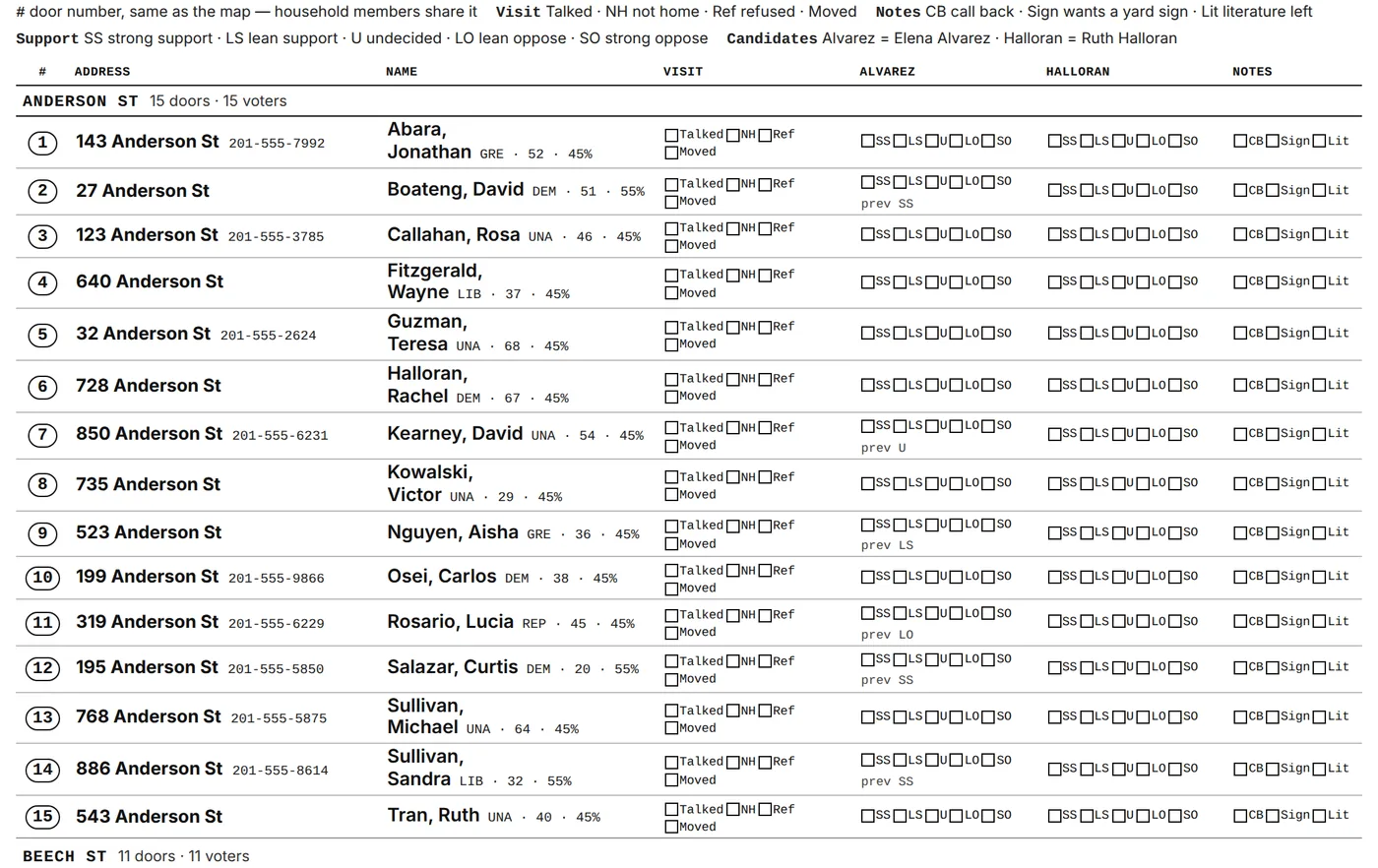
For a whole Saturday, a walk packet prints up to 60 turfs at once behind a cover page listing each turf's canvasser, doors, voters, and streets, with an overview map, and prints each distinct script once. When the sheets come back, the Walk lists data-entry screen keys them in fast (number keys record support) and picks up where you stopped. Paper and app contacts land in the same analytics.
- Keep scripts short: 3–7 questions is plenty.
- Lead with the easiest question (support level) to set rhythm.
- Map every question to a structured field. Free text is hard to analyze in bulk.
- Don't print sheets more than a day ahead; contact history moves underneath you.
Live canvasser tracking
Active Canvassers combines map and list views with the most recent location, activity, and session counts reported by each field app. Location updates depend on permission, connectivity, and device state; a stale pin is not proof of where someone is now. The map says Live only while its feeds have answered in the last 75 seconds. Otherwise it reads Not live, with the time of the last update.
Staff can send direct messages or broadcasts; field workers see them in Inbox and the announcement banner. Assigned captains have additional turf tools.
The current location-retention worker deletes pings older than 60 days. Use the visible tracking and sync indicators to understand whether a device is reporting or still offline.
Paid canvassing
Some programs pay their canvassers, and paying people is its own discipline: hours, rates, eligibility, checks, and a paper trail that has to hold up. Turn on the paid_staff feature and a Paid Program desk appears under Field to run all of it in one place, instead of in a spreadsheet nobody else can open.
The desk breaks into a handful of working areas:
The rules around all this are deliberately tilted toward the people getting paid. The desk can only approve eligibility, never start it, and there's no bulk-approve, so nobody gets waved through in a batch. Declining eligibility sends nothing to the canvasser; declining a shift's pay requires a note, so there's always a reason on the record. And rate or policy changes are never retroactive. The rate is snapshotted onto the sign-up when the shift actually happens, so raising your rates tomorrow never rewrites what someone already earned.
Careful: owed pay
Revoking eligibility only ever applies going forward, and voiding a check always reissues it, so owed pay is never simply deleted. Every money action is written to the audit log. Reading, approving, and paying all require manage_volunteers; flipping the whole program's master switch on or off additionally requires manage_campaign.
Ballot chase, matchback & captains
Matchback imports early-vote and absentee-return data and links it to the voter file so teams can distinguish recorded ballots from voters still to reach. Ballot-chase views include outstanding and rejected ballots, status sync, and cure follow-up tools.
Captain workspaces help supervisors work their assigned turf. On Election Day, staff send each poll watcher a no-login link for their shift, where they post arrival, hourly turnout counts, line waits, and departure, which roll up into turnout by precinct. Each driver gets a link for the day listing their rides in pickup order, and marks each one acknowledged, picked up, completed, or no-show. Riders can confirm by texting back. The links expire, can be revoked, and stop working if the assignment changes.
Voted-today lists (who has voted so far on Election Day, so the knock-again list shrinks as the day goes on), chase aging rules, and cure-deadline handoffs are not built yet. Check each list’s source and freshness before assigning work.