Reviewed September 24, 2026. Features depend on your enabled modules, permissions, and configured integrations.
What is Romulus?
Romulus combines the tools campaigns and elected officials normally buy from four or five separate vendors (a voter file, a canvassing app, a donor CRM, a communications suite, and a constituent-services system) into a single application backed by a single database. One tool, one login, one place your data lives.
A few things it isn't: it isn't a replacement for every voter file (a New Jersey race that signs up online gets its district's voters from NJR's copy of the State's list, which carries no phone numbers or emails; campaigns elsewhere bring their file in from a state party, a commercial vendor, or the secretary of state, and Romulus indexes and annotates it), and it isn't an ad-buying platform (it exports audiences formatted for the platforms; you run the buys there).
See the features tour for what each module does.
Signing up
Added October 3, 2026. A New Jersey race can sign up online. There is one plan with every module and unlimited users, priced by the registered voters in your district; pricing has the bands. Statewide races, races outside New Jersey, and campaigns that want hands-on setup from NJR talk to us instead.
- Find your race. At romulus.northjerseyresearch.com/signup, choose the office and the district. Romulus counts the registered voters in it and shows your band and price before anything else.
- Sign in with your NJR account, or create one. Romulus has no separate password; your NJR account is how you sign in from then on.
- Describe the campaign. The name your team sees, the committee's legal name for invoices (with its ELEC or FEC committee ID if you have one), and the election you're running in. You can name a treasurer, who gets every receipt and can be given access, and a co-owner, such as the candidate if that isn't you. You also confirm the voter information is for election and campaign use only.
- Choose how to pay: monthly, prepaid to election day, or annual. Checkout takes a card, and the first 14 days are free if the card and your NJR account haven't had a trial before. During the trial, email sending is off and exports are capped at 500 rows.
- Start in your workspace. Your district's voters are already loaded from NJR's copy of the State's voter list, and the setup checklist is open.
Guided setup
The setup checklist walks you through the first steps in order, inside the app. Self-serve support is a ticket from inside the app, with a first response within one business day. Hands-on setup by our team is part of campaigns that sign with NJR directly, not an add-on to an online signup.
Invite your team
Every plan has unlimited users. The treasurer and co-owner you named at signup get their invitations by email. Invite staff from the team settings and give each a role; each invite sends them to NJR Accounts to sign up or sign in with the same email address. Volunteers who only knock doors use the Canvasser app instead.
Getting started
Campaign staff sign in with their NJR account: press Sign in with NJR on the login page. Your NJR account holds your password, passkeys, and account recovery, so a forgotten password is reset there, not in Romulus. A staff invite sends you to NJR Accounts to sign up or sign in with the same email address. If your campaign hasn't moved to NJR sign-in yet, you'll still see the email and password form, with an authenticator code if two-factor is on. Canvassers keep their own field login, covered in the Canvasser app guide. You land on Home: a strip of the numbers that matter, quick actions, the docket of what needs doing in order, what's on for today and the weekend, the wire of contacts as they land, 14-day trends, and the clip file of New Jersey political news. Customize sets the density and which sections show.
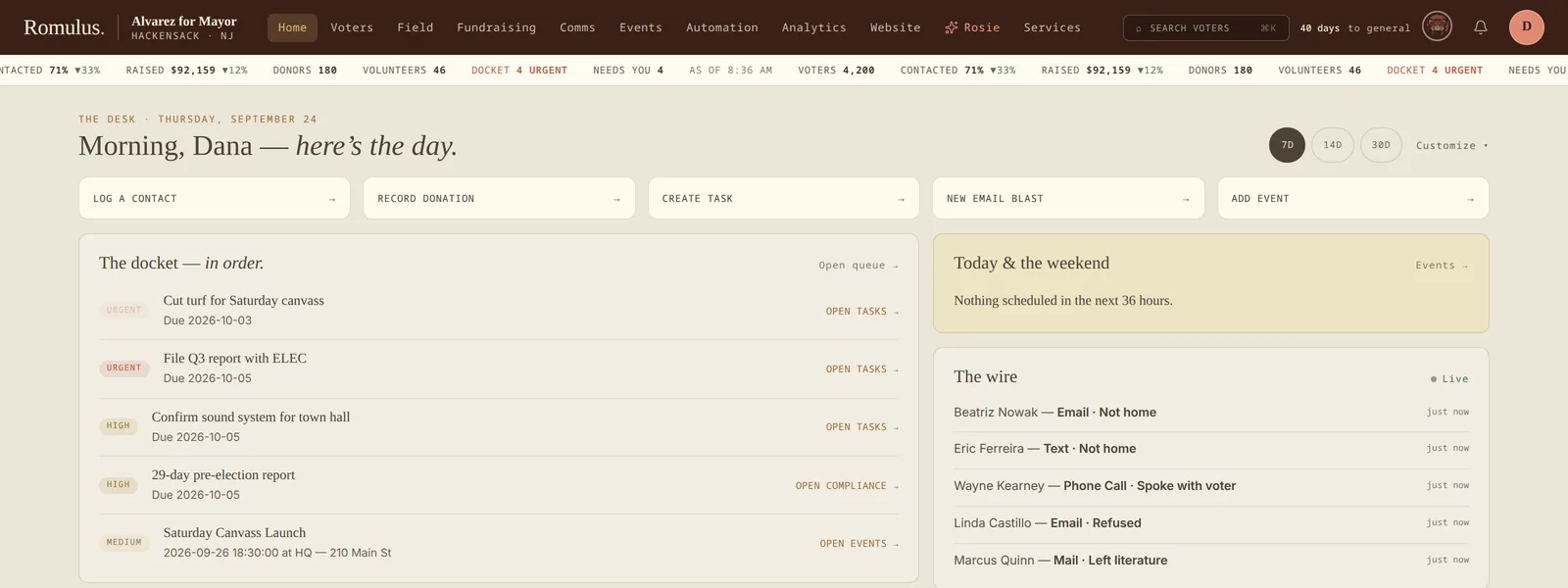
The tab bar shows only what your campaign has enabled and your role allows: Home, Voters, Field, Fundraising, Comms, Events, Automation, Analytics, and Website, then Rosie and Services. Each tab opens a menu of its desks: volunteers live under Field, and Playbooks, Workflows, Agents, and Paths under Automation. If a tab you expect is missing, ask your admin about your permissions. Members of multiple campaigns get a campaign selector, and each login is scoped to one campaign's data.
Most edits save automatically, with a confirmation toast on every save: voter notes and engagement save when you click away, drafts auto-save as you type, and contact events log instantly. From your avatar you can review your sessions and pick a theme. Where staff sign in with NJR, passwords, passkeys, and two-factor live in your NJR account instead.
Romulus vs. Numa
Romulus serves campaigns; Numa serves elected offices. They share application infrastructure and a voter file, with separate organization records, users, permissions, and campaign/office tables. A campaign login does not grant office access.
Office staff can read selected campaign history only through the dedicated history view, for a linked voter, with the required permission and an active campaign-history grant. Reads are audited. This is a controlled connection, not an automatic transfer of campaign notes or donor records into casework.
Curia is the government-institution workspace on the same platform. Its current foundation includes government accounts, departments, roles, permissions, and a login shell at /gov/. Service requests, permits, enforcement, records requests, billing, the resident portal, and Clio are planned modules; the desk placeholders do not yet perform that work.
Security & privacy
The platform supports revocable cookie sessions, password hashing, two-factor authentication, passkeys, role permissions, and feature controls. When staff sign-in moves to NJR Accounts, Romulus refuses staff passwords, email sign-in links, and local passkeys at the server, so the NJR account is the only way in. Sensitive actions and AI requests are logged; audit retention is configurable rather than permanent.
Romulus is hosted by NJR. We take nightly database backups and keep voter snapshots, and a full restore is something we run, not a button in the app. Export options depend on the module and permission; there is no universal “every screen exports” control.
The current canvasser location-retention worker deletes pings older than 60 days. Email/SMS suppression checks exist, but the product roadmap still tracks consistency work across calling, walk lists, and advertising exports. Review each channel’s eligible audience instead of assuming one opt-out control covers every workflow.
Reading these guides against your release
These guides were reviewed against the application source on September 24, 2026 (release v0.68.0). Every campaign runs the current release, since NJR hosts Romulus; features still depend on organization settings, permissions, and configured integrations.
Recent capabilities include sign-in through NJR Accounts, walkable turf auto-cut and walk packets, redesigned walk sheets, Rosie canvass planning, a Modeling desk that grades its own scores against past elections, precinct election results, SMS budgets, consent, and quiet hours, the Automation desk and rebuilt Agents desk, and the Services tab for ordering NJR work. Partial features are labeled in the relevant guides.